
5. Releases
This chapter provides an overview of the latest product releases, including key updates and changes. It also outlines recommended product bundles to ensure optimal compatibility and performance.
5.1. 2.27.1 - August 2026
This section details the release notes for the Docker image voraus.core, version 2.27.1. It describes the changes, fixes, and improvements introduced in this version and provides information on the components it has been tested with.
5.1.1. Release Notes - 2.27.1
Release Version: 2.27.1
Release Date: August 2026
Preamble
This release is intended for customers using voraus.core in a virtual environment or with a real robot, see Currently integrated robot models for more details.
Not all changes and improvements described in these release notes have been tested on a physical system; some have been verified through virtual testing.
This release updates the CodeMeter runtime to version 9.10 and adapts the provided Compose files accordingly.
Requirements
This release includes the Docker-containerized voraus.core for evaluation on x86 systems. For the complete list, please check Hardware Requirements.
This release requires a license for the voraus.core.
Requirements to control a real robot are defined in Robot Requirements.
Breaking Changes
The
latesttag is no longer available for the voraus Docker images. You must reference a specific image tag (version) directly in your Compose file. For details on updating the image tag, see Setting up the Runtime and Software Update.
Enhancements
Update the CodeMeter runtime to version 9.10. The Compose files provided with the voraus software manual have been adapted accordingly, see Setting up the Runtime.
Ongoing Improvements
As part of our continuous improvement, the following edge cases and finer details are being refined over the long term. They do not affect regular operation, but are listed here for transparency:
Blending behavior in certain PTP-to-LIN transitions, see PTP-to-LIN blending edge cases.
Variations in the duration of robot stops under specific conditions, see robot stop duration.
Behavior near configured limits in particular edge cases, see limit edge cases.
5.1.2. Release Bundle - 2.27.1
The Docker image voraus-core in the version 2.27.1 has been successfully tested with:
voraus 3D Visu in version 3.1.2,
voraus Simulation in version 0.11.3,
And therefore is compatible with the voraus.pioneer Examples in version 1.18.0. It can also be used with the:
voraus EtherCAT Python Client in version 1.4.0,
and voraus Roboception in version 0.8.6.
5.2. 2.27.0 - June 2026
This section details the release notes for the Docker image voraus.core, version 2.27.0. It describes the changes, fixes, and improvements introduced in this version and provides information on the components it has been tested with.
5.2.1. Release Notes - 2.27.0
Release Version: 2.27.0
Release Date: June 2026
Preamble
This release is intended for customers using voraus.core in a virtual environment or with a real robot, see Currently integrated robot models for more details.
Not all changes and improvements described in these release notes have been tested on a physical system; some have been verified through virtual testing.
This release includes the support for Yaskawa robots as well as various bug fixes and improvements to stability and robustness.
Requirements
This release includes the Docker-containerized voraus.core for evaluation on x86 systems. For the complete list, please check Hardware Requirements.
This release requires a license for the voraus.core.
Requirements to control a real robot are defined in Robot Requirements.
Enhancements
Add support for Yaskawa robots with the YRC1000micro cabinet, see more details in the Yaskawa Robot Requirements:
Yaskawa GP25-12
Yaskawa HC10DTP
Yaskawa HC10DT-A10
Note
If you are interested in using Yaskawa robots with voraus.core, please contact the voraus support.
Add alarm subcodes for Yaskawa robots.
Update the voraus Robot Control documentation: voraus Robot Control.
Bug Fixes and Improvements
Improve inverse kinematics inside the internal cylinder.
Ongoing Improvements
As part of our continuous improvement, the following edge cases and finer details are being refined over the long term. They do not affect regular operation, but are listed here for transparency:
Blending behavior in certain PTP-to-LIN transitions, see PTP-to-LIN blending edge cases.
Variations in the duration of robot stops under specific conditions, see robot stop duration.
Behavior near configured limits in particular edge cases, see limit edge cases.
5.2.2. Release Bundle - 2.27.0
The Docker image voraus-core in the version 2.27.0 has been successfully tested with:
voraus 3D Visu in version 1.0.1,
voraus Simulation in version 0.11.0,
And therefore is compatible with the voraus.pioneer Examples in version 1.17.0. It can also be used with the:
voraus EtherCAT Python Client in version 1.4.0,
and voraus Roboception in version 0.8.6.
5.3. 2.26.0 - May 2026
This section details the release notes for the Docker image voraus.core, version 2.26.0. It describes the changes, fixes, and improvements introduced in this version and provides information on the components it has been tested with.
5.3.1. Release Notes - 2.26.0
Release Version: 2.26.0
Release Date: May 2026
Preamble
This release is intended for customers using voraus.core in a virtual environment or with FANUC or KUKA robots.
Not all changes and improvements described in these release notes have been tested on a physical system; some have been verified through virtual testing.
Various bug fixes and improvements to the stability and robustness have been achieved with this release. Singularity monitoring is now active with this release.
Requirements
This release includes the Docker-containerized voraus.core for evaluation on x86 systems. For the complete list, please check Hardware Requirements.
This release requires a license for the voraus.core.
Requirements to control a real robot are defined in Robot Requirements.
Breaking Changes
Singularity monitoring is activated. This can be deactivated with an env variable if the movement of the robot is too restricted:
VRC_DEACTIVATE_SINGULARITY_MONITORING: True. See also the overview of environment variables in the Deployment Example the section voraus Robot Control.
Enhancements
Update the voraus Robot Control documentation with content on blending, robot stops, and voraus conventions: voraus Robot Control.
Add singularity monitoring for robots.
Add support for FANUC M-20iB/35S.
Add collision models for:
FANUC M-20iD/35
FANUC M-20iB/35S
Bug Fixes and Improvements
PTP/Lin Blending:
Improve blending radius for special cases.
Various other improvements.
The transition time into the error stop ramp and out of the stop ramp is now configurable via the parameter
transitionTimeAxesStop.Add OPC UA nodes to publish DH parameters and axes kinematic data (type & rotation direction) from the robot struct.
Improve the error message of M-311. Add Cartesian pose and joint limits in the description text.
Fix spam error messages after an error occurred in position streaming.
For KUKA robots, the tool management via RSI can now be done in [mm]. Therefore, the voraus file
voraus_cell.submust be updated, see also the KUKA requirements.
Known Issues
Currently, when the user defines a very low TCP velocity limit (e.g., 100 mm/s), TCP velocity violations may occur during motion because the robot does not decelerate sufficiently to stay within the configured limit. No issues have been observed at velocity limits of 250 mm/s or above.
For PTP/Lin Blending, we have observed that the
TimeOverridehas little influence on the geometry of the blending segment.Blending of PTP/Cart with a small segment length (1 mm/0.1°) might trigger an error on rare occasions.
The configured stop duration might be decreased by a few cycles if the stop was triggered at a negligible velocity.
Limitations for the use of the KUKA robot
Do not use the KUKA smartPad for jogging while the RSI script is running or paused (for example, to leave violated safety planes or for teaching). The robot moves back to the last commanded RSI pose as soon as the RSI script is continued. If you want to jog via the KUKA smartPad, please stop the RSI script beforehand and restart it after the jogging is finished.
Always reset voraus.operator error first before starting or restarting the RSI script on the KUKA smartPad. Otherwise, the robot may try to move and will most likely stop immediately, which may result in a loud “crack” from the robot, indicated by torque error on the smartPad.
5.3.2. Release Bundle - 2.26.0
The Docker image voraus-core in the version 2.26.0 has been successfully tested with:
voraus 3D Visu in version 0.19.0,
voraus Simulation in version 0.10.4,
And therefore is compatible with the voraus.pioneer Examples in version 1.16.0. It can also be used with the:
voraus EtherCAT Master in version 1.5.1,
voraus EtherCAT Python Client in version 1.4.0,
and voraus Roboception in version 0.8.6.
5.4. 2.25.0 - April 2026
This section details the release notes for the Docker image voraus.core, version 2.25.0. It describes the changes, fixes, and improvements introduced in this version and provides information on the components it has been tested with.
5.4.1. Release Notes - 2.25.0
Release Version: 2.25.0
Release Date: April 2026
Preamble
This release is intended for customers using voraus.core in a virtual environment or with FANUC or KUKA robots.
Not all changes and improvements described in these release notes have been tested on a physical system; some have been verified through virtual testing.
Various bug fixes and improvements to the stability and robustness have been achieved with this release.
Requirements
This release includes the Docker-containerized voraus.core for evaluation on x86 systems. For the complete list, please check Hardware Requirements.
This release requires a license for the voraus.core.
Requirements to control a real KUKA or FANUC robot are defined in Robot Requirements.
Breaking Changes
Failing robot tool commands now trigger errors instead of warnings (
AddTool,ModifyTool,RemoveTool). These commands have an impact on the resulting robot movement. If any of these commands do not succeed, this will now result in a proper robot error.
Enhancements
Implement Cartesian velocity estimation for robots with reduced mobility.
Updated voraus Robot Control documentation: voraus Robot Control.
Bug Fixes and Improvements
PTP/Lin Blending:
Improve blending radius for special cases.
Various other improvements.
Improve transition into the stop error ramp: The transition into the braking ramp for axis-based stops has been made smoother and now lasts 0.1 seconds. This slightly increases the braking time for rapid stops as well as the acceleration during time-based axis stops.
Known Issues
Currently, when the user defines a very low TCP velocity limit (e.g., 100 mm/s), TCP velocity violations may occur during motion because the robot does not decelerate sufficiently to stay within the configured limit. No issues have been observed at velocity limits of 250 mm/s or above.
For PTP/Lin Blending, we have observed that the
TimeOverridehas little influence on the geometry of the blending segment.Blending of PTP/Cart with a small segment length (1 mm/0.1°) might trigger an error on rare occasions.
Configured stop duration might be decreased by a few cycles if the stop was triggered at a negligible velocity.
Limitations for the use of the KUKA robot
Do not use the KUKA smartPad for jogging while the RSI script is running or paused (for example, to leave violated safety planes or for teaching). The robot moves back to the last commanded RSI pose as soon as the RSI script is continued. If you want to jog via the KUKA smartPad, please stop the RSI script beforehand and restart it after the jogging is finished.
Always reset voraus.operator error first before starting or restarting the RSI script on the KUKA smartPad. Otherwise, the robot may try to move and will most likely stop immediately, which may result in a loud “crack” from the robot, indicated by torque error on the smartPad.
5.4.2. Release Bundle - 2.25.0
The Docker image voraus-core in the version 2.25.0 has been successfully tested with:
voraus 3D Visu in version 0.18.1,
voraus Simulation in version 0.10.2,
And therefore is compatible with the voraus.pioneer Examples in version 1.15.0. It can also be used with the:
voraus EtherCAT Master in version 1.3.0,
voraus EtherCAT Python Client in version 1.3.0,
and voraus Roboception in version 0.8.6.
5.5. 2.24.0 - March 2026
This section details the release notes for the Docker image voraus.core, version 2.24.0. It describes the changes, fixes, and improvements introduced in this version and provides information on the components it has been tested with.
5.5.1. Release Notes - 2.24.0
Release Version: 2.24.0
Release Date: March 2026
Preamble
This release is intended for customers using voraus.core in a virtual environment or with FANUC or KUKA robots.
Not all changes and improvements described in these release notes have been tested on a physical system; some have been verified through virtual testing.
New features have been added with this release, such as the possibility of blending between linear (LIN) and joint point-to-point (PTP) robot motion commands.
Various bug fixes and improvements to the stability and robustness have been achieved with this release.
Requirements
This release includes the Docker-containerized voraus.core for evaluation on x86 systems. For the complete list, please check Hardware Requirements.
This release requires a license for the voraus.core.
Requirements to control a real KUKA or FANUC robot are defined in Robot Requirements.
Enhancements
PTP/Lin Blending, see more information in the section LIN/PTP Blending.
Updated voraus Robot Control documentation: voraus Robot Control.
Thread isolation:
Add parameter
isIsolatedtothreadSettings(rtSettings.json) to configure a thread as isolated from other threads. All other threads will be prevented from running on the same CPU by disabling their CPU affinity on this CPU.It is activated by default when
cpuAffinityis defined as a single CPU (int) and must be explicitly disabled if not wanted. This flag will be ignored whencpuAffinityis defined as a CPU mask (list of bools) or configured as default (-1).Add
VRC_CPUAFFINITY_MAINenvironment variable to enable pinning of theRC-MAINthread (main voraus Robot Control thread) to a specific CPU ID directly without editing configuration files. It overrides the config value and only supports single CPU IDs but no affinity masks.
Add the new
SendNextCyclicPositionBatchcommand to the OPC UA Interface. It enables sending multiple position frames for the position streaming in a single request, see voraus Robot Control documentation - Send Next Cyclic Position.Reduced the minimum configurable robot stop time to 5 ms.
Bug Fixes and Improvements
A bug has been fixed that caused false positive self-collision errors.
Blending and motion planning have been improved by testing several corner cases.
Known Issues
Currently, when the user defines a very low TCP velocity limit (e.g., 100 mm/s), TCP velocity violations may occur during motion because the robot does not decelerate sufficiently to stay within the configured limit. No issues have been observed at velocity limits of 250 mm/s or above.
For PTP/Lin Blending, we have observed that the
TimeOverridehas little influence on the geometry of the blending segment.
Limitations for the use of the KUKA robot
Do not use the KUKA smartPad for jogging while the RSI script is running or paused (for example, to leave violated safety planes or for teaching). The robot moves back to the last commanded RSI pose as soon as the RSI script is continued. If you want to jog via the KUKA smartPad, please stop the RSI script beforehand and restart it after the jogging is finished.
Always reset voraus.operator error first before starting or restarting the RSI script on the KUKA smartPad. Otherwise, the robot may try to move and will most likely stop immediately, which may result in a loud “crack” from the robot, indicated by torque error on the smartPad.
LIN/PTP Blending
Blending between linear (LIN) and joint point-to-point (PTP) segments is now possible.
Note
This feature is currently in a testing stage and therefore disabled by default. It can be activated with the
environment variable VRC_FEAT_CART_PTP_BLENDING: True.
Parametrization
The blending must be defined in percent (%). The blending parameter will be individually used for both segments.
If blending is specified in absolute distance (m) for the Cartesian segment, it is converted into a percentage parameter. The percentage parameter is then applied to the joint segment, this is shown in Fig. 228.
This results in no symmetric blending. That means, that the effective distance to the overblended point can be different in both segments.
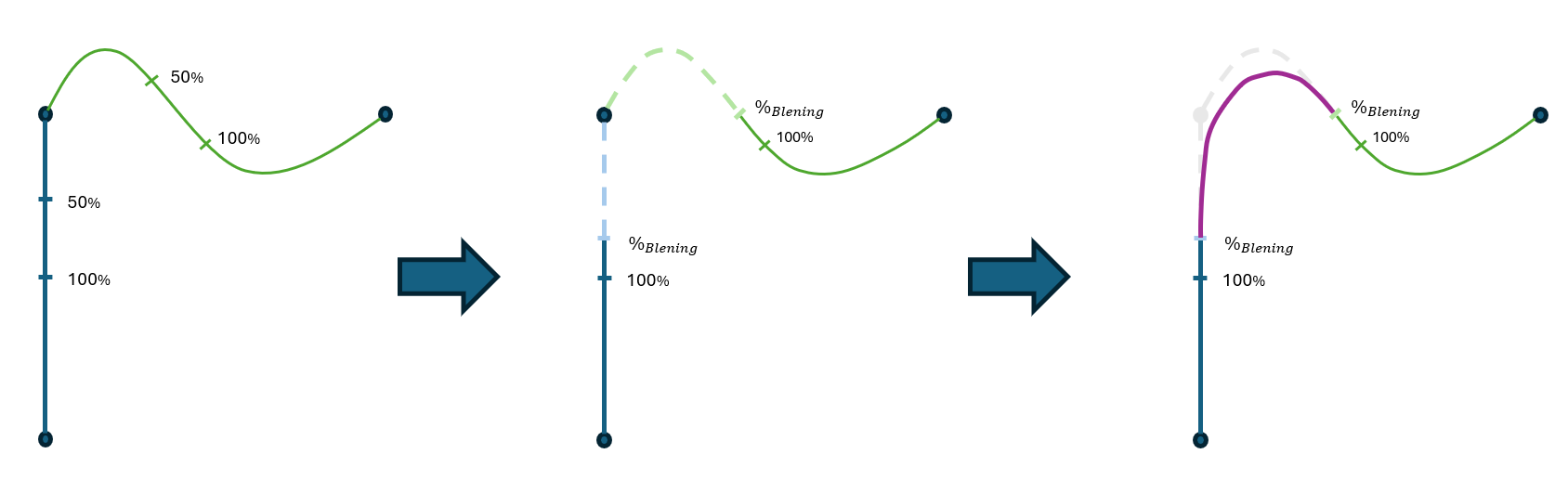
Fig. 228 Asymmetric blending between LIN and PTP segments with individually applied blending parameters
Blending Geometry
The exact geometry of the blending segment is not known.
The blending points only describe the points at which the robot enters and exits the blending segment.
It is to be expected that the robot will not leave the path immediately after the first blending point, it might remain on the original path until fading into the blended path.
Furthermore, it can return to the original path even before the second blending point.
The geometry of the blending segment depends on several factors, such as the resulting speed and acceleration settings of both segments (movement command setting and/or limit sets).
Furthermore, the set filter time, see system parameter, can also have an influence on the blending geometry. This topic is currently under investigation.
It is also expected that the blending segment geometry will differ depending on whether it is blended from LIN to PTP or from PTP to LIN.
The resulting velocity and acceleration along the blending segment are not known in the trajectory planning stage. However, they are monitored during interpolation.
The compliance of the configured jerk values is still under investigation. Nevertheless, no discontinuities or short peaks in the resulting acceleration profile have been observed until now.
5.5.2. Release Bundle - 2.24.0
The Docker image voraus-core in the version 2.24.0 has been successfully tested with:
voraus 3D Visu in version 0.17.1,
voraus Simulation in version 0.10.1,
And therefore is compatible with the voraus.pioneer Examples in version 1.14.0. It can also be used with the:
voraus EtherCAT Master in version 1.2.0,
voraus EtherCAT Python Client in version 1.3.0,
and voraus Roboception in version 0.8.6.
5.6. 2.23.0 - February 2026
This section details the release notes for the Docker image voraus.core, version 2.23.0. It describes the changes, fixes, and improvements introduced in this version and provides information on the components it has been tested with.
5.6.1. Release Notes - 2.23.0
Release Version: 2.23.0
Release Date: February 2026
Preamble
This release is intended for customers using voraus.core in a virtual environment or with FANUC or KUKA robots.
Not all changes and improvements described in these release notes have been tested on a physical system; some have been verified through virtual testing.
New features have been added with this release.
Various bug fixes and improvements to the stability and robustness have been achieved with this release.
Requirements
This release includes the Docker-containerized voraus.core for evaluation on x86 systems. For the complete list, please check Hardware Requirements.
This release requires a license for the voraus.core.
Requirements to control a real KUKA or FANUC robot are defined in Robot Requirements.
Breaking Changes
Increase the KUKA KR 10 R900-2 limitations (axis position, speed, …) to the data sheet values. This will alter the behavior of the robot.
Enhancements
Updated and added documentation of workspace configuration for voraus Robot Control: voraus Robot Control.
Minor refactorings in preparation for Cartesian <-> PTP blending.
Add virtual robot models for Universal Robots: UR15, UR12e and UR5/CB3
Bug Fixes and Improvements
The error handling mechanism has been updated. The subscription lifetime count has been increased, and logging has been improved to provide more detailed diagnostic information.
Fixed a parsing issue of the server search list with newer versions of CodeMeter.
Improved description in the OPC UA Server for voraus Robot Control:
Improved OPC UA description for Cartesian Constraints
Add prismatic joint information to OPC UA descriptions
Blending has been improved for several corner cases.
Prevent exceptions when writing crash logs using the generic EtherCAT interface.
Fixed a rare issue during symlink creation to the log file.
Add default initialization of
ErrorListJSON.Many improvements to the control of KUKA robots:
The RSI script can be continued after a robot error and no longer has to be restarted.
Improved error message upon releasing the ED during jogging.
KUKA safety errors are now propagated to the voraus.core properly.
voraus.core errors are now propagated to the KUKA controller properly.
Known Issues
Limitations for the use of the KUKA robot
Do not use the KUKA smartPad for jogging while the RSI script is running or paused (for example, to leave violated safety planes or for teaching). The robot moves back to the last commanded RSI pose as soon as the RSI script is continued. If you want to jog via the KUKA smartPad, please stop the RSI script beforehand and restart it after the jogging is finished.
Always reset voraus.operator error first before starting or restarting the RSI script on the KUKA smartPad. Otherwise, the robot may try to move and will most likely stop immediately, which may result in a loud “crack” from the robot, indicated by torque error on the smartPad.
5.6.2. Release Bundle - 2.23.0
The Docker image voraus-core in the version 2.23.0 has been successfully tested with:
voraus 3D Visu in version 0.16.1,
voraus Simulation in version 0.9.11,
And therefore is compatible with the voraus.pioneer Examples in version 1.13.0. It can also be used with the:
voraus EtherCAT Master in version 1.1.1,
voraus EtherCAT Python Client in version 1.2.1,
and voraus Roboception in version 0.8.6.
5.7. 2.22.0 - December 2025
This section details the release notes for the Docker image voraus.core, version 2.22.0. It describes the changes, fixes, and improvements introduced in this version and provides information on the components it has been tested with.
5.7.1. Release Notes - 2.22.0
Release Version: 2.22.0
Release Date: December 2025
Preamble
This release is intended for customers using voraus.core in a virtual environment or with FANUC or KUKA robots.
Not all changes and improvements described in these release notes have been tested on a physical system; some have been verified through virtual testing.
New features have been added with this release.
Various bug fixes and improvements to the stability and robustness have been achieved with this release.
Requirements
This release includes the Docker-containerized voraus.core for evaluation on x86 systems. For the complete list, please check Hardware Requirements.
This release requires a license for the voraus.core.
Requirements to control a real KUKA or FANUC robot are defined in Robot Requirements.
Breaking Changes
Refactored handling of CLI arguments and environment variables of the voraus Robot Control to comply with other components:
Changed precedence of options: cli > env > config
Renamed environment variables from
VORAUS_RC_toVRC_Realtime configuration must be enabled via the CLI or the environment variable (
VRC_USE_REALTIME_ENVIRONMENT)
Enhancements
Official documentation for the voraus Robot Control: voraus Robot Control.
Motor nominal torque is now configurable. The new config parameter
Axes.DriveParameters.RatedMotorTorqueis available in the config files. For more information see voraus Robot Control.Automatic patch of outdated config files during voraus Robot Control startup, see voraus Robot Control.
Clean up of the main config file (
config.json):Removed unused section
DataPublishingConfig version changed from
190004to190005
Clean up of the robot config file (
<robotname>.json)Remove unused parameter
Axes.DriveParameters.MountingDirectionRemove unused parameter
Axes.DriveParameters.Partnumber
Add support for the FANUC robot M-20iD/35.
Bug Fixes and Improvements
Improved blending stability
Fixed a TCP velocity limit violation
Fixed known issue from release 2.21.0: The
tcpVelocityRotationalnow slows down the robot during PTP movements and within blending segments, to prevent anytcpVelocityRotationallimit violations.Fixed known issue from release 2.21.0: The
tcpForcelimit is now monitored. External sensors are needed.Improved error messages.
Improved symlink handling while searching for JSON files.
Improved performance of limit management.
Known Issues
Limitations for the use of the KUKA robot
Do not use the KUKA smartPad for jogging while the RSI script is running or paused (for example, to leave violated safety planes or for teaching). The robot moves back to the last commanded RSI pose as soon as the RSI script is continued. If you want to jog via the KUKA smartPad, please stop the RSI script beforehand and restart it after the jogging is finished.
Always reset voraus.operator error first before starting or restarting the RSI script on the KUKA smartPad. Otherwise, the robot may try to move and will most likely stop immediately, which may result in a loud “crack” from the robot, indicated by torque error on the smartPad.
5.7.2. Release Bundle - 2.22.0
The Docker image voraus-core in the version 2.22.0 has been successfully tested with:
voraus 3D Visu in version 0.16.1,
voraus Simulation in version 0.9.11,
And therefore is compatible with the voraus.pioneer Examples in version 1.13.0. It can also be used with the:
voraus EtherCAT Master in version 1.1.0,
voraus EtherCAT Python Client in version 1.2.1,
and voraus Roboception in version 0.8.6.
5.8. 2.21.0 - October 2025
This section details the release notes for the Docker image voraus.core, version 2.21.0. It describes the changes, fixes, and improvements introduced in this version and provides information on the components it has been tested with.
5.8.1. Release Notes - 2.21.0
Release Version: 2.21.0
Release Date: October 2025
Preamble
This release is intended for customers using voraus.core in a virtual environment or with FANUC or KUKA robots.
Not all changes and improvements described in these release notes have been tested on a physical system; some have been verified through virtual testing.
New features have been added with this release.
Various bug fixes and improvements to the stability and robustness have been achieved with this release.
Requirements
This release includes the Docker-containerized voraus.core for evaluation on x86 systems. For the complete list, please check Hardware Requirements.
This release requires a license for the voraus.core.
Requirements to control a real KUKA robot:
KR C4 KUKA control cabinet
Required KUKA option packages are defined in WorkVisual installation and Setting up the RSI interface.
Required voraus files, which are included in this release, are defined in Setting up the RSI interface.
Requirements to control a real FANUC robot are defined in Robot Requirements.
Enhancements
Add
partnumberas an optional parameter to the robot config file:Multiple parameter sets: It is now possible to define multiple user limit sets. The limit sets must be stored as JSON files in the following path:
VORAUS_DATA_DIR/userLimitSets/.All values are defined in the units [m], [°], [W], and [Nm], velocities in [m/s] and [°/s], and accelerations in [m/s^2] and [°/s^2].
For axis limits, 6 values must currently still be specified. The values for unused axes should be set to high values.
{
    "name": "MyLimit",
    "isActive": true,
    "axesAcceleration": [210.0, 210.0, 210.0, 210.0, 210.0, 210.0],
    "axesVelocity": [140.0, 140.0, 170.0, 180.0, 180.0, 180.0],
    "axesPositionMin": [-220.0, -310.0, -160.0, -310.0, -220.0, -360.0],
    "axesPositionMax": [220.0, 130.0, 160.0, 130.0, 220.0, 360.0],
    "axesTorqueRelative": [10.0, 10.0, 10.0, 5.0, 5.0, 5.0],
    "axesTorqueAbsolute": [200.0, 200.0, 200.0, 100.0, 100.0, 50.0],
    "tcpVelocityTranslational": 2.0,
    "tcpVelocityRotational": 360.0,
    "robotPower": 5000
}
An overview of the limit parameters can be found at the section Limit definitions, also:
Limits are usually only monitored. If a limit is exceeded, the robot stops and an error is triggered. Please note that axes accelerations can be exceeded by a certain factor before an error is triggered, and external forces are not currently monitored.
Not all limits lead to an adjustment of the trajectory.
Not all limits can be used by every robot. Some limits require additional sensors (e.g., for external forces).
Key parameter: The
“name"must be a unique string, and"isActive"describes whether the limit should be active when starting robot control. The names“MACHINE"and“SAFETY"can not be used for user limits.All other parameters are optional, as seen in this example:
Limit sets are read during the start-up of voraus Robot Control. Changes to the JSON files during runtime are only applied after the next restart.
A list of existing limit sets can be viewed in OPC UA under
Robot/Limitations/ListOfLimitSets(Node ID: 107200, Vector of strings).The settings of the limit sets can be viewed using the OPC UA method
Robot/Commands/Limitations/GetLimitSet(Node ID: 107004).User-defined limit sets can be activated or deactivated using the commands
Robot/Commands/Limitations/ActivateUserLimitSet(Node ID: 107002) andRobot/Commands/Limitations/DeactivateUserLimitSet(Node ID: 107003):A limit set can only be activated/deactivated when the robot is at a standstill. The robot must also not be in ACTIVE or GRAVCOMP mode. MACHINE & SAFETY limit sets cannot be activated or deactivated.
These changes are not persistent. After a restart, the configuration of the config files is restored.
From all activated limit sets, the most restrictive limit is determined in each cycle and set as the active limit.
Active limits are published via OPC UA at
Robot/Limitations/ActiveLimits/...
Bug Fixes and Improvements
A problem with jogging around the z-axis has been fixed.
Unnecessary standstill time after PTP commands that end in standstill has been removed.
Known Issues
The
tcpVelocityRotationallimit does not slow down the robot during PTP movements. In addition, limit violations may occur in blending segments.The
tcpForcelimit is not monitored yet.
Limitations for the use of the KUKA robot
Do not use the KUKA smartPad for jogging while the RSI script is running or paused (for example, to leave violated safety planes or for teaching). The robot moves back to the last commanded RSI pose as soon as the RSI script is continued. If you want to jog via the KUKA smartPad, please stop the RSI script beforehand and restart it after the jogging is finished.
Always reset voraus.operator error first before starting or restarting the RSI script on the KUKA smartPad. Otherwise, the robot may try to move and will most likely stop immediately, which may result in a loud “crack” from the robot, indicated by torque error on the smartPad.
Limit definitions
Limit |
Size |
Unit |
Used for |
|---|---|---|---|
|
For each axis |
Maximal axes acceleration [rad/s^2] (ROTATIONAL), [m/s^2] (PRISMATIC) |
|
|
For each axis |
Maximal axes velocity [rad/s] (ROTATIONAL), [m/s] (PRISMATIC) |
|
|
For each axis |
Minimal axes position [rad] (ROTATIONAL), [m] (PRISMATIC) |
|
|
For each axis |
Maximal axes position [rad] (ROTATIONAL), [m] (PRISMATIC) |
|
|
For each axis |
Maximal difference between measured and commanded torque on load side [Nm] (ROTATIONAL), [N] (PRISMATIC) |
|
|
For each axis |
Maximal absolute measured torque on load side [Nm] (ROTATIONAL), [N] (PRISMATIC) |
|
|
Scalar |
Maximal TCP translational velocity [m/s] |
|
|
Scalar |
Maximal TCP angular velocity [m/s] |
|
|
Scalar |
Maximal TCP measured force [N] |
NOT CHECKED YET! |
|
Scalar |
Maximal elbow translational velocity [m/s] |
|
|
Scalar |
Maximal robot mechanical power [W] |
|
5.8.2. Release Bundle - 2.21.0
The Docker image voraus-core in the version 2.21.0 has been successfully tested with:
voraus 3D Visu in version 0.16.4,
voraus Simulation in version 0.9.11,
And therefore is compatible with the voraus.pioneer Examples in version 1.12.0. It can also be used with the:
voraus EtherCAT Master in version 1.1.0,
voraus EtherCAT Python Client in version 1.0.2,
and voraus Roboception in version 0.8.4.
5.9. 2.20.0 - September 2025
This section details the release notes for the Docker image voraus.core, version 2.20.0. It describes the changes, fixes, and improvements introduced in this version and provides information on the components it has been tested with.
5.9.1. Release Notes - 2.20.0
Release Version: 2.20.0
Release Date: September 2025
Preamble
This release is intended for customers using voraus.core in a virtual environment or with FANUC or KUKA robots.
Various bug fixes and other improvements have been achieved with this release.
Requirements
This release includes the Docker-containerized voraus.core for evaluation on x86 systems. For the complete list, please check Hardware Requirements.
This release requires a license for the voraus.core.
Requirements to control a real KUKA robot:
KR C4 KUKA control cabinet
Required KUKA option packages are defined in WorkVisual installation and Setting up the RSI interface.
Required voraus files, which are included in this release, are defined in Setting up the RSI interface.
Breaking Changes
rtsettings.jsonis now a mandatory config file. It is shipped by default. Robot control will terminate during startup if this file is missing or broken.Jogging commands are now velocity-limited to not violate workspace limits (e.g., axis position limits).
Benchmark logs are now written into the log directory (
/var/log/voraus/rt_benchmarks/).
Enhancements
Allow manually controlled commands in rescue mode (not on voraus.operator yet).
Add EtherCAT dcDelta (Distributed Clock) benchmark to evaluate synchronization.
Changes
Removed the encryption from the voraus-error-handler, so that feedback for missing licenses can be provided.
Bug Fixes and Improvements
A path planning bug has been fixed.
The histogram size of the motion planner benchmark has been adjusted.
The write directory of some EtherCAT benchmark files has been adjusted.
A ‘missing vision log file’ bug has been fixed.
Known Issues
Limitations for the use of the KUKA robot
Do not use the KUKA smartPad for jogging while the RSI script is running or paused (for example, to leave violated safety planes or for teaching). The robot moves back to the last commanded RSI pose as soon as the RSI script is continued. If you want to jog via the KUKA smartPad, please stop the RSI script beforehand and restart it after the jogging is finished.
Always reset voraus.operator error first before starting or restarting the RSI script on the KUKA smartPad. Otherwise, the robot may try to move and will most likely stop immediately, which may result in a loud “crack” from the robot, indicated by torque error on the smartPad.
5.9.2. Release Bundle - 2.20.0
The Docker image voraus-core in the version 2.20.0 has been successfully tested with:
voraus 3D Visu in version 0.16.0
voraus Simulation in version 0.9.7
And therefore is compatible with the voraus.pioneer Examples in version 1.12.0. It can also be used with the
voraus EtherCAT Master in version 1.1.0,
voraus EtherCAT Python Client in version 1.0.2,
and voraus Roboception in version 0.8.4.
5.10. 2.19.0 - August 2025
This section details the release notes for the Docker image voraus.core, version 2.19.0. It describes the changes, fixes, and improvements introduced in this version and provides information on the components it has been tested with.
5.10.1. Release Notes - 2.19.0
Release Version: 2.19.0
Release Date: August 2025
Preamble
This release is intended for customers using voraus.core in a virtual environment or with FANUC or KUKA robots.
New features have been added with this release.
Various bug fixes and improvements to the stability and robustness have been achieved with this release.
Requirements
This release includes the Docker-containerized voraus.core for evaluation on x86 systems. For the complete list, please check Hardware Requirements.
This release requires a license for the voraus.core.
Requirements to control a real KUKA robot:
KR C4 KUKA control cabinet
Required KUKA option packages are defined in WorkVisual installation and Setting up the RSI interface.
Required voraus files, which are included in this release, are defined in Setting up the RSI interface.
Breaking Changes
Fixed ID-Parameter of the following OPC UA commands. The ID-Parameter now starts counting from 1 instead of 0, as stated by the parameter description. All requests that were, contrary to the function description, called with an ID of 0 will now fail:
EnableForbiddenVolume
RemoveForbiddenVolume
DisableForbiddenVolume
SetForbiddenVolumeCuboid
SetForbiddenVolumeCylinder
SetForbiddenVolumeSphere
EnableBoundaryPlane
RemoveBoundaryPlane
DisableBoundaryPlane
SetBoundaryPlane
Enhancements
Crash logs for the simulation.
Runtime data is saved to the voraus data directory and is still available after a restart. This includes the time override, stop parameters, and the active tool. The default directory in the Docker container is
/root/data/voraus/voraus-robot-control/.A new OPC UA command was added to set a desired time override with transition duration.
Robot/Commands/Control/SetTimeOverrideWithTransitionTimeNodeID: 100276
Increase the number of digital I/O modules:
Total number of modules: 2 Input, 2 Output.
Total number of IOs: 8 Inputs, 8 Outputs.
OPC UA error data - the list of pending errors is returned under
Error.ErrorListJSON.Can be read from the voraus.core - ErrorHandler (port 48404). Currently, this only provides a hardcoded list of errors. In the future, it will return the list of all pending errors of all components.
OPC UA fieldbus data - the OPC UA endpoints have been added under
Fieldbus.EtherCATfor bus diagnostics.If it is configured as a real fieldbus, the data is read out.
In the virtual example, parameters are loaded.
Functions have been added
Robot.Commands.Fieldbus->ResetMissingFrameInformationFunctions have been added
Robot.Commands.Fieldbus.EtherCATWriteSDO/ReadSDO functions for the SEW SDO interface.An interface for FoE has been added to
Robot.Commands.Fieldbus.EtherCAT.Change the cycle time from 2 ms to 1 ms.
Robot stops are now configurable:
Stop ramps can be configured for different stop sources (ErrorStop, SS1, and UserStops). Prioritization of error sources: SS1 > ErrorStop > UserStop
Stop methods are: Rapid stop (all axes stop with max. acceleration), axes stop time-based (synchronous axis stop with defined duration), and on-path stop with defined duration.
On-path stop can only be executed for existing motion profiles (move commands & jogging).
It is not possible to change from an axis stop to an on-path stop.
Heartbeat - Keep-alive signal (OPC UA):
Clients can register themselves to send periodic heartbeats.
If a heartbeat signal from a client is not received in the specified interval, an error is raised.
OPC UA commands are located at Robot-Commands-Heartbeat, and status information is available at System- HeartbeatManager.
Add a new argument
ForbiddenVolumeto theSetForbiddenVolumecommands in voraus Robot Control OPC UA interface. This argument is only a placeholder for the future division into forbidden volumes and workspaces. It is intended to avoid breaking changes in the future.New ENV variable
VORAUS_RC_FIELDBUS_INTERFACE_NAMEto define the EtherCAT interface name. Theconfig.jsonfile no longer needs to be mounted.Calculation of effective mass in task-space. The calculated value is published on
KinematicsAndDynamicsOPC UA node.The linear velocity and position of the target point for effective mass are published on
KinematicsAndDynamicsOPC UA node.Added an alternative link layer implementation, which can be enabled by specifying the environment variable
ECAT_LINK_LAYER=MMAP. Evaluation of this implementation is ongoing; it might be removed in the future or used by default. The environment variable must be added to the Helm chart:env: name: ECAT_LINK_LAYER value: MMAP
Changes
Updated OPC UA library (open62541) to version 1.4.6.
The Python package
opcuahas been dropped and replaced in favor ofasyncua.Error handling: The list of possible errors now contains all system-control errors.
Adjusted motion profile filter length from 90 ms to 220 ms. Recommended from SEW to reduce jerk: Update of the
config.jsonfile from voraus Robot Control.Changed the implementation of the rtBenchmark generation:
The timestamp format of the generated benchmark directories changed from MM.DD_HH:mm to YYYY-MM-DD–HH-mm-ss.
Known Issue: The histogram of the motion planner benchmark is currently limited to 2.5 ms; all measurements greater than this duration are capped. This is only a visual issue; it has no impact on the statistics (max, avg, p99).
File version of the main voraus Robot Control config changed from 190003 to 190004, and the
VerboseTimingInformationfield was removed (path to the file:/etc/voraus/voraus-robot-control/config.json).
Bug Fixes and Improvements
Improving the robustness of the shutdown process.
Improving the robustness of the error handler.
Bug fix for the limitation of higher movement speeds: the tolerance for the axis following the error might have been exceeded. The tolerance could be exceeded, but this has effectively disabled the axis position validation.
The command
Move Circularhas been improved so that:Fewer errors occur.
The calculation methods
CENTERandANGLE_DIRECTIONare more tolerant of inaccurate circle definitions.
Blending has been improved:
The calculation has been improved to be able to blend with a higher probability.
A bug has been fixed that occurred when a movement command was blended with 100 % on both sides (acceleration problem).
Bug fix for a “Blending-Nullptr” problem.
Various input validations and bugfixes for the jogging and blending interfaces.
Orientation blending path length:
Example:
pos1: z_rot = 0°, pos2: z_rot = 90°
Move: pos1 → pos2 → pos1 with 100 % Blending
Expected z_rot: 0° → 45° → 0°
Previously z_rot increased to > 45° in blending segment
An acceleration error after failed blending has been fixed.
The stop command has been improved:
Movement commands are now rejected while the robot executes the stop command.
Rapid stop and axis stop time-based brake ramps are smoothed. The acceleration jump at the end of the brake ramp has been replaced by a smooth transition to a standstill. This slightly increases the braking time of the rapid stop.
Stop ramps (rapid stop & axis time-based) have been improved.
During the break ramp, a quick stop will now be triggered if the expected break time is exceeded. Previously, this duration was fixed to 1 s.
The list of possible errors now contains all system-control errors.
Fixed duplicated loading of tool collision models.
TCP slows down as soon as it enters the slowdown area of a volume or plane and approaches the constraint.
Fixed duplicated loading of tool collision models.
Standstill detection has been improved. The brakes should not be enabled before the robot is in a standstill (noticed during brake tests).
Note: The resulting standstill tolerance value is slightly higher than in the prototype tests.
Stability improvement when the IPC boots up.
Fix spam in log: “Execute … with stop method: …”.
Improved error messages for boundary plane violation errors.
FieldBusSEW: A missing slave in an EtherCAT package does not directly trigger an error. The absence is only logged. Ultimately, other mechanisms will trigger once the slave is missing for multiple frames.
Fixed an issue in voraus-system-control that prevented a controlled stop of the voraus.core container, resulting in no benchmark statistics being written.
Known Issues
Limitations for the use of the KUKA robot
Do not use the KUKA smartPad for jogging while the RSI script is running or paused (for example, to leave violated safety planes or for teaching). The robot moves back to the last commanded RSI pose as soon as the RSI script is continued. If you want to jog via the KUKA smartPad, please stop the RSI script beforehand and restart it after the jogging is finished.
Always reset voraus.operator error first before starting or restarting the RSI script on the KUKA smartPad. Otherwise, the robot may try to move and will most likely stop immediately, which may result in a loud “crack” from the robot, indicated by torque error on the smartPad.
5.10.2. Release Bundle - 2.19.0
The Docker image voraus-core in the version 2.19.0 has been successfully tested with:
voraus 3D Visu in version 0.16.0
voraus Simulation in version 0.9.7
And therefore is compatible with the voraus.pioneer Examples in version 1.12.0. It can also be used with the
voraus EtherCAT Master in version 1.1.0,
voraus EtherCAT Python Client in version 1.0.2,
and voraus Roboception in version 0.8.4.