
2.3.2. Configuration for the voraus.core
Note
The following chapter describes the configuration of the voraus.core software. Please select the section corresponding to your setup, whether it is a physical robot or a virtual instance.
For the voraus.core in a virtual environment please proceed with the chapter Setting up the Runtime.
Setting up the voraus.core with a Robot
The voraus.core with a FANUC, KUKA or Yaskawa robot requires hardware with a PREEMPT_RT kernel. As for the underlying operating system, the voraus.core software runs exclusively on x86 systems, ARM systems are not supported.
Please see section Robot Requirements for more details on the hardware requirements to control a real KUKA, FANUC or Yaskawa robot.
Example Integration with an UP Squared IPC
If you do not have a real-time-capable IPC, we recommend an UP Squared IPC with the following specifications:
Model |
UP Squared Series UPS-APLP4-A20-0432 |
|---|---|
Processor |
Intel® Pentium™ N4200 (up to 2.5 GHz) – Quad Core (x86) |
Graphics |
Intel® HD Graphics 505-N4200/E3950 |
RAM |
4 GB |
Storage |
32 GB |
USB |
|
Ethernet |
2 x GbLAN (Realtek RTL8111G-CG) |
Operating System |
Linux Preempt RT |
Operating Temperature |
0°C ~ 60°C |
Power Requirements |
5 V DC-in @ 6 A 5.5/2.1 mm jack |
Power consumption (typical) |
18 W |
Housing |
102 x 99 x 56.65 mm, ABS material |
Certification |
CE/FCC Class A, RoHS compliant |
Setting up the UP Squared IPC
The setup of the IPC is straightforward and can be done in a few steps. Please follow the documentation of the following tools:
voraus Debian ISO: This tool injects a preseed file into the official Debian netinst ISO, enabling fully automated headless installations without user interaction.
voraus IPC Tools Ansible: voraus IPC-related Ansible roles and tools. This collection helps to set up a real-time system with all prerequisites to deploy the voraus.core.
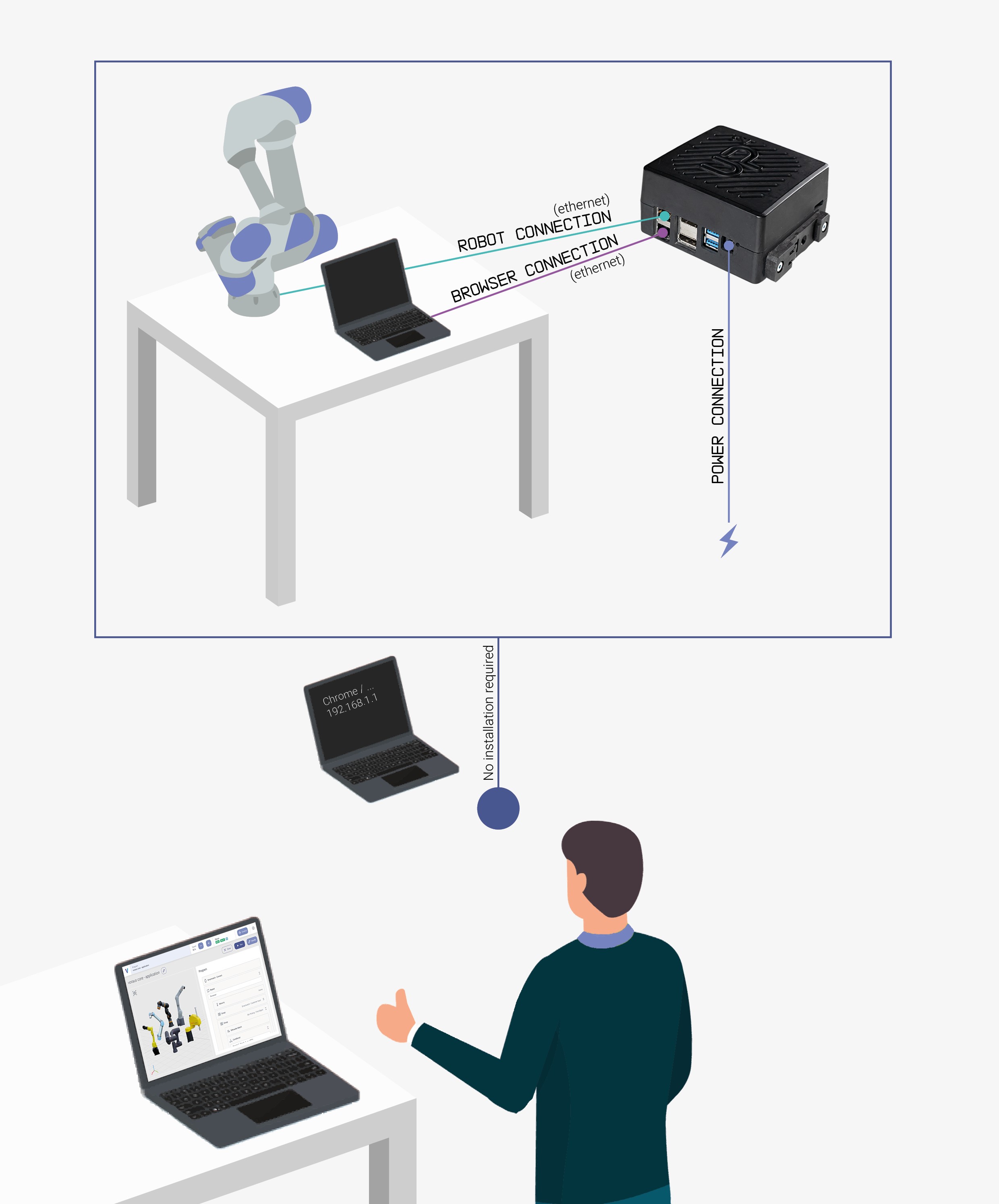
After preparing the IPC, connect the IPC and robot as shown in Fig. 27:
Connect the UP Squared IPC to your robot control cabinet via Ethernet.
Connect the UP Squared IPC to a computer or laptop via Ethernet.
Connect the UP Squared IPC to the power supply.
Open your browser (preferably Chrome) and type in the following IP address: http://<robot-IP>.
voraus.core supports execution as a containerized software stack managed via Portainer on the UP Squared IPC. Portainer itself is not part of voraus.core and must be installed and maintained by the customer.
Setting up the Runtime
Depending on your specific use case, you may also refer to the installation guide provided in the voraus.pioneer Examples. For a general approach, please proceed with the next chapter Stack Configuration for the voraus.core in a virtual environment.
Configure your runtime with a Compose File
The configuration of the voraus.core is defined in a Compose file (docker-compose.yml).
Create a docker-compose.yml file in a persistent workspace directory. This file defines the software stack and
is used for future updates, too. For a detailed example of how the services are configured and customized, refer to the
Deployment Example.
Stack Configuration for the voraus.core in a virtual environment
The following file shows an example Compose file for a virtual robot.
 1version: "3.3"
 2
 3services:
 4  codemeter:
 5    hostname: codemeter
 6    image: wibusystems/codemeter:9.10@sha256:c48aaab981e8fb34814c94d74b366aaa2786528153eb9429ae0403896eb6cc03
 7    environment:
 8      CM_REMOTE_SERVER: "host.docker.internal" # Use the CodeMeter runtime service on the host machine.
 9    extra_hosts:
10      - "host.docker.internal:host-gateway"
11    restart: unless-stopped
12
13  voraus-core:
14    image: voraus.jfrog.io/docker/voraus-core:2.27.1 # x-release-please-version
15
16    depends_on:
17      codemeter:
18        condition: service_healthy
19
20    environment:
21      # Robot control backend
22      VORAUS__components__voraus-robot-control__enabled: True
23      VORAUS__components__voraus-robot-control-py__enabled: False
24
25      # Robot specification
26      VORAUS__robot__robotType: "VORAUS_INDUSTRIAL_ROBOT"
27
28      # Licensing
29      CODEMETER_HOST: codemeter
30      VORAUS__components__voraus-license-handler__enabled: True
31      VORAUS_LICENSE_HANDLER__API_URL: http://host.docker.internal:22358
32
33    extra_hosts:
34      - "host.docker.internal:host-gateway"
35
36    ports:
37      # Port for the voraus.operator webapp.
38      # You can change it if the port 8080 isn't available,
39      # but make sure that you are changing it in later steps as well.
40      - 8080:80
41      # Port for the voraus license handler
42      - 8081:8081
43
44    restart: on-failure
45
46    volumes:
47      - "voraus_data_volume:/root/data/voraus/"
48      - "voraus_log_volume:/var/log/voraus/"
49
50volumes:
51  voraus_data_volume:
52    driver: local
53  voraus_log_volume:
54    driver: local
Stack Configuration for the voraus.core with FANUC robots
The following file shows an example Compose file for a FANUC robot.
 1version: "3.3"
 2
 3services:
 4  codemeter:
 5    hostname: codemeter
 6    image: wibusystems/codemeter:9.10@sha256:c48aaab981e8fb34814c94d74b366aaa2786528153eb9429ae0403896eb6cc03
 7    environment:
 8      CM_REMOTE_SERVER: "host.docker.internal" # Use the CodeMeter runtime service on the host machine.
 9    extra_hosts:
10      - "host.docker.internal:host-gateway"
11    restart: unless-stopped
12
13  voraus-core:
14    image: voraus.jfrog.io/docker/voraus-core:2.27.1 # x-release-please-version
15
16    depends_on:
17      codemeter:
18        condition: service_healthy
19
20    environment:
21      # Robot control backend
22      VORAUS__components__voraus-robot-control__enabled: False
23      VORAUS__components__voraus-robot-control-py__enabled: True
24
25      # Robot specification
26      VORAUS__robot__robotType: "FANUC_M_10ID_16S"
27
28      # FANUC variables
29      FANUC_ROBOT: "SIX_AXIS"
30      FANUC_ADDRESS: "192.168.0.1"
31      RMI_PORT: 16001
32
33      # Licensing
34      CODEMETER_HOST: codemeter
35      VORAUS__components__voraus-license-handler__enabled: True
36      VORAUS_LICENSE_HANDLER__API_URL: http://host.docker.internal:22358
37
38    extra_hosts:
39      - "host.docker.internal:host-gateway"
40
41    ports:
42      # Port for the voraus.operator webapp.
43      # You can change it if the port 8080 isn't available,
44      # but make sure that you are changing it in later steps as well.
45      - 8080:80
46      # Port for the voraus license handler
47      - 8081:8081
48
49    restart: on-failure
50
51    volumes:
52      - "voraus_data_volume:/root/data/voraus/"
53      - "voraus_log_volume:/var/log/voraus/"
54
55volumes:
56  voraus_data_volume:
57    driver: local
58  voraus_log_volume:
59    driver: local
Stack Configuration for the voraus.core with KUKA robots
The following file shows an example Compose file for a KUKA robot.
 1version: "3.3"
 2
 3services:
 4  codemeter:
 5    hostname: codemeter
 6    image: wibusystems/codemeter:9.10@sha256:c48aaab981e8fb34814c94d74b366aaa2786528153eb9429ae0403896eb6cc03
 7    environment:
 8      CM_REMOTE_SERVER: "host.docker.internal" # Use the CodeMeter runtime service on the host machine.
 9    extra_hosts:
10      - "host.docker.internal:host-gateway"
11    restart: unless-stopped
12
13  voraus-core:
14    image: voraus.jfrog.io/docker/voraus-core:2.27.1 # x-release-please-version
15
16    depends_on:
17      codemeter:
18        condition: service_healthy
19
20    environment:
21      # Robot control backend
22      VORAUS__components__voraus-robot-control__enabled: True
23      VORAUS__components__voraus-robot-control-py__enabled: False
24
25      # Robot specification
26      VORAUS__robot__robotType: "KUKA_KR_10_R900_2"
27
28      # Licensing
29      CODEMETER_HOST: codemeter
30
31      # REAL ROBOT (Operator)
32      VORAUS__robot__isVirtual: False
33      VRC_USE_REALTIME_ENVIRONMENT: True
34      VRC_ADJUST_IRQ_SETTINGS: False
35      VORAUS__components__voraus-license-handler__enabled: True
36      VORAUS_LICENSE_HANDLER__API_URL: http://host.docker.internal:22358
37
38    extra_hosts:
39      - "host.docker.internal:host-gateway"
40
41    # REAL ROBOT (Operator)
42    cap_add:
43      - IPC_LOCK
44      - SYS_NICE
45    ulimits:
46      rtprio: 50
47    devices:
48      - /dev/cpu_dma_latency
49
50    ports:
51      # Port for the voraus.operator webapp.
52      # You can change it if the port 8080 isn't available,
53      # but make sure that you are changing it in later steps as well.
54      - 8080:80
55      # Port for the license handler web ui
56      - 8081:8081
57      # Port for the KUKA RSI communication (Operator)
58      - 192.168.100.142:59152:59152/udp
59
60    volumes:
61      - "voraus_data_vol:/root/data/voraus/"
62
63    restart: on-failure
64
65volumes:
66  voraus_data_vol:
67    driver: local
Stack Configuration for the voraus.core with Yaskawa robots
The following file shows an example Compose file for a Yaskawa robot.
 1services:
 2  codemeter:
 3    hostname: codemeter
 4    image: wibusystems/codemeter:9.10@sha256:c48aaab981e8fb34814c94d74b366aaa2786528153eb9429ae0403896eb6cc03
 5    environment:
 6      CM_REMOTE_SERVER: "host.docker.internal" # Use the CodeMeter runtime service on the host machine.
 7    extra_hosts:
 8      - "host.docker.internal:host-gateway"
 9    restart: unless-stopped
10
11  voraus-core:
12    image: voraus.jfrog.io/docker/voraus-core:2.27.1 # x-release-please-version
13
14    depends_on:
15      codemeter:
16        condition: service_healthy
17
18    environment:
19      # Robot control backend
20      VORAUS__components__voraus-robot-control__enabled: True
21      VORAUS__components__voraus-robot-control-py__enabled: False
22
23      # Robot specification
24      VORAUS__robot__robotType: "YASKAWA_HC10DTP"
25      YASKAWA_IP: "192.168.1.70"
26      YASKAWA_PORT: 11000
27
28      # REAL ROBOT (Operator)
29      VORAUS__robot__isVirtual: False
30      VRC_USE_REALTIME_ENVIRONMENT: True
31      VRC_ADJUST_IRQ_SETTINGS: False
32
33      # Licensing
34      CODEMETER_HOST: codemeter
35      VORAUS__components__voraus-license-handler__enabled: True
36      VORAUS_LICENSE_HANDLER__API_URL: http://host.docker.internal:22358
37
38    extra_hosts:
39      - "host.docker.internal:host-gateway"
40
41    # REAL ROBOT (Operator)
42    cap_add:
43      - IPC_LOCK
44      - SYS_NICE
45    ulimits:
46      rtprio: 50
47    devices:
48      - /dev/cpu_dma_latency
49
50    ports:
51      - 80:80
52      # Port for the YASKAWA communication (Operator)
53      - 11000:11000/udp
54
55      - 48401:48401 # RC-OPCUA
56      - 48404:48404 # Error Handler
57
58      - 8081:8081
59
60    volumes:
61      - "voraus_data_vol:/root/data/voraus/"
62
63    restart: unless-stopped
64
65volumes:
66  voraus_data_vol:
67    driver: local
Most parts of the configuration are static and need no editing with the following exceptions:
Since release 2.27.1, we stopped using Docker latest tags. All Compose files always pin an exact version of the services. If you want to change the version, replace the tag in the Compose file.
Based on the robot model, the
VORAUS__robot__robotTypevariable can be modified:
Note
A manual reload of the voraus.operator in the browser is necessary, if the page is already loaded. The
updated configuration of the Docker Compose file like the new VORAUS__robot__robotType will only be applied
after a page refresh.
For a detailed example of how the services are configured and can be customized with additional environment variables, refer to the Deployment Example.
The port section of the stack configuration defines the mapping of the voraus.core ports to the ports of the host system. A port mapping consists of the following pattern:
- {host-port}:{container_port}Any port of the container can be mapped to a free port of the host system.
By default, the port of the voraus.operator is mapped from port 80 to port 8080. If port 8080 is already blocked by another service, simply adjust the mapping.
Additionally, set the FANUC_ADDRESS to the IP address of the FANUC controller and set the RMI_PORT to the configured port number for the RMI communication (default is 16001).
voraus components must be activated in the environment section by setting a variable in the pattern:
20environment:
21
22  # Components:
23  VORAUS__components__{component_name}__enabled: True
Their default port can be adjusted with
VORAUS__components__{plugin_name}__bindPort: {new_bind_port}This is only necessary if the default port of a service is already occupied by another.
The following components exist:
Table 2 Component Definition Component Name
Default Port
Description
voraus-roboception-app
5000
Integration of Roboception cameras and detection algorithms.
The port section of the stack configuration defines the mapping of the voraus.core ports to the ports of the host system. A port mapping consists of the following pattern:
- {host-port}:{container_port}Any port of the container can be mapped to a free port of the host system.
By default, the port of the voraus.operator is mapped from port 80 to port 8080. If port 8080 is already blocked by another service, simply adjust the mapping.
The IP address 192.168.100.142 can be modified if needed. It will be referred to as <IP_of_the_voraus.ipc>. In any case, it must match the IP address and port used by the RSI interface The port 59152 as well as the IP 192.168.100.142 are selected for the communication with the KUKA control. If needed, this port or the IP address can be modified, e.g., when the address is already used by another device.
voraus components must be activated in the environment section by setting a variable in the pattern:
20environment:
21
22  # Components:
23  VORAUS__components__{component_name}__enabled: True
Their default port can be adjusted with
VORAUS__components__{plugin_name}__bindPort: {new_bind_port}This is only necessary if the default port of a service is already occupied by another.
The following components exist:
Table 3 Component Definition Component Name
Default Port
Description
voraus-roboception-app
5000
Integration of Roboception cameras and detection algorithms.
The port section of the stack configuration defines the mapping of the voraus.core ports to the ports of the host system. A port mapping consists of the following pattern:
- {host-port}:{container_port}Any port of the container can be mapped to a free port of the host system.
By default, the port of the voraus.operator is mapped from port 80 to port 8080. If port 8080 is already blocked by another service, simply adjust the mapping.
The
YASKAWA_IPaddress192.168.1.70can be modified if needed.
voraus components must be activated in the environment section by setting a variable in the pattern:
20environment:
21
22  # Components:
23  VORAUS__components__{component_name}__enabled: True
Their default port can be adjusted with
VORAUS__components__{plugin_name}__bindPort: {new_bind_port}This is only necessary if the default port of a service is already occupied by another.
The following components exist:
Table 4 Component Definition Component Name
Default Port
Description
voraus-roboception-app
5000
Integration of Roboception cameras and detection algorithms.
The port section of the stack configuration defines the mapping of the voraus.core ports to the ports of the host system. A port mapping consists of the following pattern:
- {host-port}:{container_port}Any port of the container can be mapped to a free port of the host system.
By default, the port of the voraus.operator is mapped from port 80 to port 8080. If port 8080 is already blocked by another service, simply adjust the mapping.
The internal Yaskawa interpolator limits the velocities of the robot to the limit set of the controller. To prevent resulting following errors, please set the configured user limits accordingly, see the voraus Robot Control documentation. It is recommended to set the user limits lower than the internal Yaskawa limits.
Installation of additional Packages
At times, additional Python packages are required to complement the existing software stack. This section outlines several methods to accomplish this. While the examples presented focus on the two most common approaches, users can also use any other pip tool, such as a private PyPI server.
Warning
If you want to install Python packages from the file system, please make sure that the packages are compatible to the Python interpreter inside the Docker image. This is especially relevant for binary distributions.
Build a new Docker image from a base image manually
This section shows how to manually build a new Docker image containing additional Python packages (.whl files) located in a separate directory.
Note
In this tutorial it is assumed that the process is done on a voraus.ipc. However, all steps can also be done with any system running Docker. In that case you might need to update the paths used in this tutorial.
After following these steps, the resulting Docker image can be imported, as explained in Software Update.
For this method the voraus.ipc does not need access to the internet. Instead, all packages can be downloaded to your machine and copied to the voraus.ipc via an ssh connection.
Note
Prerequisites
You received a base Docker image from voraus. In the following, it will be called “voraus-core:<core-image-tag>”. Replace <core-image-tag> with the version number of your voraus.core.
Install the your voraus.core image (see Software Update).
Download/gather all required additional Python packages as wheels (.whl) in a folder <yourFolderName/> locally.
Copy the folder containing the wheels to
dockerWorkspace/on the voraus.ipc:
scp -r <yourFolderName/> localuser@<robot-IP>:/home/localuser/dockerWorkspace/
Connect to your voraus.ipc:
ssh localuser@<robot-IP>
Create a
Dockerfile.devin/home/localuser/and edit it:
touch Dockerfile.dev
nano Dockerfile.dev
Paste the following content to the
Dockerfile.dev:
FROM voraus-core:<core-image-tag> # Replace <core-image-tag> with the version number of your voraus.core.
RUN --mount=type=bind,source=./dockerWorkspace/,target=/pip-packages/ \
      pip install --upgrade \
      /pip-packages/*.whl
Save the Dockerfile.dev by pressing Ctrl + X and confirm with Y + Enter.
Build a new Docker image:
docker build -f Dockerfile.dev -t <insertYourImageName> .Note
The dot
.at the end is important!
The new Docker image is now available and can be used as described in Software Update.